
Control Center for Zooper1.06 - Google Play
You'll be able to see results in few seconds.
Publisher Description
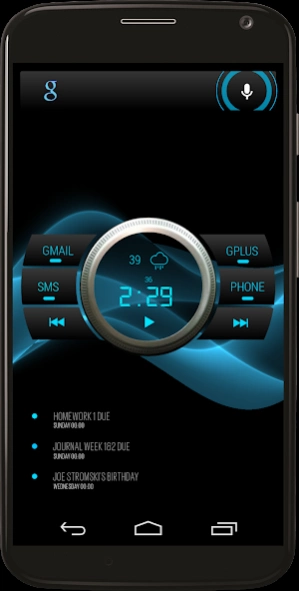

Control Center for Zooper Widget Pro
READ FIRST: ZOOPER WIDGET PRO AND MEDIA UTILITES MUST BE INSTALLED FIRST AND CONFIGURED PROPERLY BEFORE INSTALLING THIS PACKAGE!
This is set up on Nova Launcher,
8 rows 7 columns
width margin- none
height margin-none
dock- disabled
resize all widgets- on
widget overlap- on
overlap when placing-on
Also includes a red version.
Control Center contains 3 widgets a top search bar, the main control center widget which displays time, weather, battery percent along with music controls and shows cover art when playing. Each button for Gmail, SMS, Google+, and Phone opens the corresponding app. You WILL need to set the text module SMS under Zooper/Layouts to YOUR SMS app. Notification lights activate for SMS, Gmail, and Missed Calls on the corresponding buttons.
If you have any questions, problems, or need help with layout please hit the website link at the bottom and post there or email me at the address below. I would be glad to help!
Google play can sometimes corrupt the files during compression uploading to the play store. This is not a problem with Zooper Widget or this widget pack. If you download this widget pack and experience this please email me first so I can fix it before leaving a bad review. Thanks!
About Control Center for Zooper
The company that develops Control Center for Zooper is Drea Apps. The latest version released by its developer is 1.06.
To install Control Center for Zooper on your Android device, just click the green Continue To App button above to start the installation process. The app is listed on our website since 2014-04-19 and was downloaded 0 times. We have already checked if the download link is safe, however for your own protection we recommend that you scan the downloaded app with your antivirus. Your antivirus may detect the Control Center for Zooper as malware as malware if the download link to com.dreaapps.zwskin.ControlCenter is broken.
How to install Control Center for Zooper on your Android device:
- Click on the Continue To App button on our website. This will redirect you to Google Play.
- Once the Control Center for Zooper is shown in the Google Play listing of your Android device, you can start its download and installation. Tap on the Install button located below the search bar and to the right of the app icon.
- A pop-up window with the permissions required by Control Center for Zooper will be shown. Click on Accept to continue the process.
- Control Center for Zooper will be downloaded onto your device, displaying a progress. Once the download completes, the installation will start and you'll get a notification after the installation is finished.
Program Details
System requirements
Download information
Pricing
Version History
version 1.06
posted on 2014-04-19
Update 1.06: fixed some fonts not loading correctly., Also added a new fix for corrupt file issues. This requires 1 new permission, "read/write to media storage" this permission ONLY installs the necessary Fonts, IconSets, and bitmaps. There will be a Control Center icon in your app drawer. Tap the icon to load all assets, you will see a toast notification that assets were fixed. That is all! Thanks to Lutz Linke for this method!
Disclaimer
Official Google Play Link
We do not host Control Center for Zooper on our servers. We did not scan it for viruses, adware, spyware or other type of malware. This app is hosted by Google and passed their terms and conditions to be listed there. We recommend caution when installing it.
The Google Play link for Control Center for Zooper is provided to you by apps112.com without any warranties, representations or guarantees of any kind, so access it at your own risk.
If you have questions regarding this particular app contact the publisher directly. For questions about the functionalities of apps112.com contact us.
